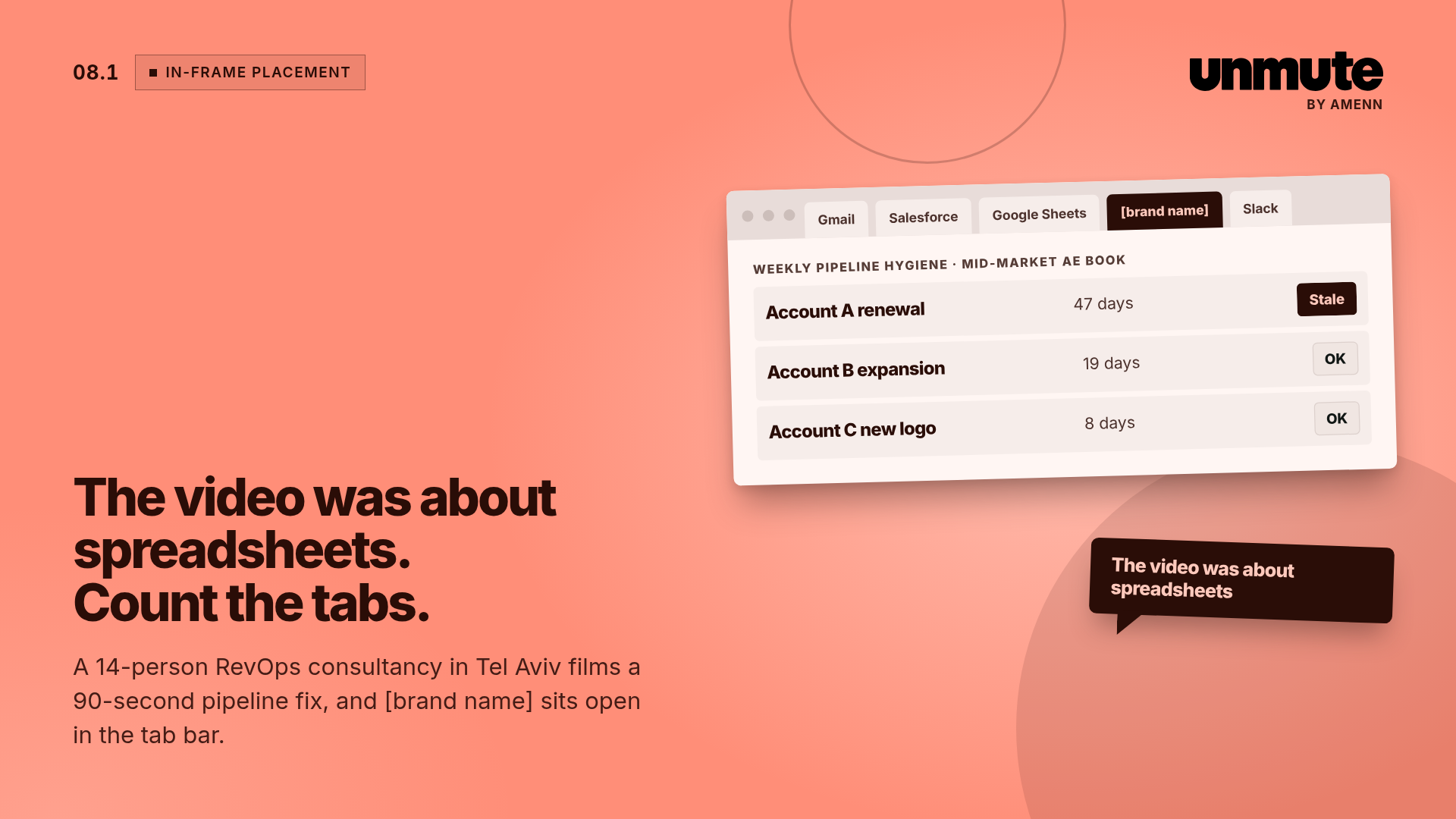
The video was about spreadsheets. Count the tabs.
Nobody questions what's already open.
0:00. A cursor blinks in an empty Google Sheet.
A 14-person revenue operations consultancy in Tel Aviv is on the clock. A mid-market SaaS client wants 40 account executives trained on weekly pipeline hygiene, and the consultancy has decided nobody in sales will open a deck. So they hit record. Ninety seconds of screen capture, headed for LinkedIn and a private client Slack.
The cursor moves. Column A: deal age. Column B: next step. Column C: last activity. Then a formula that turns every stale row an embarrassed shade of red. The sheet fills in. A sales manager could repeat it after lunch with a sandwich in the other hand.
Freeze frame at 0:12. The browser chrome is in full view. Five tabs in a row. Gmail. Salesforce. Google Sheets, in focus. A tab labeled [brand name]. Slack. Nobody says [brand name]. No lower-third, no sponsor line, no link in the caption. The tab is just open, the way a working desktop looks at 4:40 on a Thursday.
None of this happened. All of it could.
What you're watching is in-frame placement, open-tab edition. The video teaches a real skill, and the brand rides along like the coat rack in the background of a sitcom apartment.
What people repeated
Cut to the comments. Nobody mentions the tab. They're busy with the tip. "Stealing the stale-deal formula." "Can you share the sheet?" Somebody's VP of sales tags her entire team with a single fire emoji. The useful part travels, and that's the job a how-to signed up for.
The tab travels too, quietly. Someone watching at half attention, thumb already drifting toward the next post, still sees the same five tabs every time the wide shot comes back. Ask them about the setup a week later and they list the tools as a set. Salesforce, Sheets, [brand name]. The name arrives as part of a working desktop, with no claim stapled to it.
Sales engineers and RevOps (revenue operations) leads swap short fixes like trading cards, and every repost keeps the browser chrome unless the creator crops it. A buyer who never watched the clip still sees a screenshot in a Slack thread, tabs and all.
If a recap page posts a still of that desktop or lists the tools on screen, [brand name] also lands in the text answer engines read and quote. A faint signal, and it's yours.
So people repeated the spreadsheet trick out loud. What they carried home without noticing was a name parked in the spot where a working tool lives.
Why they repeated it
Old psychology, and it performs best when nobody announces it.
Start with mere exposure. See a name a few times, in passing, and it starts to feel familiar. Familiar names get the benefit of the doubt when someone writes a shortlist three months later. The open tab buys those exposures cheaply, because the viewer came for a formula and left their ad guard at the door.
Then context. The tab sits between Salesforce and Google Sheets, on a desktop busy doing a job the viewer respects. People assume whatever is already open belongs there. Nobody has to say "[brand name] is part of the stack." The layout says it for you, and a layout is very hard to argue with. It looks like Tuesday.
There's a smaller push on top. In a how-to, the viewer is copying steps. Their eyes are glued to cell D4, hunting for the parenthesis they missed. A pre-roll logo gets skipped on sight. A tab in the chrome gets filed as scenery, the same way nobody questions the mug on the presenter's desk.
All of it depends on the tip being good. Thin tip, people bounce, and a few of them spot the tab on the way out and resent it. The placement gets a seat only because the help is real.
How to run it on your budget
- Pick a problem your buyers already search for, one any good operator has whether or not your product exists. Pipeline hygiene in a sheet, a tidy QBR (quarterly business review) agenda, a formula that flags missing next steps. The test: would a sharp operator watch this if your company vanished tomorrow?
- Write the steps until a stranger can repeat them. Aim for 60 to 90 seconds. If you need a tight crop on the sheet, still give the full browser one wide shot so the tabs are legible, and hold it a beat longer than feels natural.
- Stage the browser before you hit record. Close anything confidential. Leave three to five tabs. Two should be household tools the viewer already trusts. One should be the subject of the lesson (here, Google Sheets). One should be [brand name], with a short, readable tab title. A generic "dashboard" or a long app URL wastes the slot. Park the [brand name] tab one position off center. Don't highlight it, and don't let the cursor wander over it "by accident." That hover reads like an extra glancing at the camera. Viewers notice acting.
- Record on a clean browser profile, with display scaling big enough that the tab text is readable on a phone in a moving taxi. Export 16:9 plus a vertical crop, and keep the chrome in at least some versions. The chrome is the media.
- Publish where practitioners already look: LinkedIn, a community Slack, a YouTube or Loom link in a newsletter. Write the caption about the tip and leave [brand name] out of it. If a creator was paid to leave the tab open, add whatever disclosure the platform and endorsement rules require.
- Cost. In-house, this is half a day for a marketer and an editor: call it $0 to $800 of staff time, plus a $50 to $200 mic if your laptop audio sounds like a submarine. A practitioner you already know, recorded at their own desk with your tab staged in their workflow, runs about $500 to $2,500. A mid-size LinkedIn or YouTube creator in a B2B niche often lands in the $2,500 to $8,000 range. That money buys their audience and their credibility. The tab comes with the desk.
- Measure one number: weekly branded search for [brand name], compared with the weeks before the clip went live. Sales calls and "where did you hear about us" answers will explain any bump, and that same desktop resurfacing in a screenshot two weeks later is a nice bonus. Nobody is going to click the tab. Stop refreshing the dashboard waiting for it.
Where it breaks
If the tab title is unreadable, you bought a brown smudge. If the row holds six tools nobody has heard of, the Salesforce halo evaporates. If the how-to is a demo in a stick-on mustache, people smell it within ten seconds. If a paid creator "just happens" to linger on the tab, it plays as a commercial, and you've probably picked up a disclosure problem as well.
Platform rules and advertising law ask one question: was this a paid endorsement? A tab and a pre-roll get the same answer. If money or free product changed what appeared on screen, say so in the caption, and on screen too if the platform asks for it.
The desktop on screen should match a practitioner's real stack. One built to misrepresent it gets screenshotted.
The honest setup is a real tutorial, on a real working desktop, with [brand name] actually in use or at least installed. If you can't show that, don't stage it.
And before anyone hits record, close the tab with the comp plan.